The latest new feature in Data Fitness, is the connection with Windows Active Directory (AD) to add user information like name and email to the meta and content scan results. Associating usernames to scan results is another step forward in the analysis and automatic translation into actions: adding the user names makes it possible to relate changes over time at file and folder level to specific users or the departments they belong to, and the email address can be used to directly send out analysis results with proposed actions to relevant people.
How do we do it?
The Data Fitness scan now also keeps track of Windows ACL (Access Control Lists) information. For example a file (or folder) at a network location like:
\\org-srv01.org.lan\\Path\To\Folder\Subfolder\importantdocument.pdfmight have the following ACL information on ownership and permissions:
S-1-5-21-3623811015-3361044348-30300820-1013:(I)(F)
NT AUTHORITY\SYSTEM:(I)(F)
S-1-5-21-3623811015-3361044348-30300820-3607:(I)(F)
S-1-5-21-3623811015-3361044348-30300820-513:(I)(M)
BUILTIN\Administrators:(I)(F)
The ACL overview contains both SIDs (Security Identifiers) in a S-x-x-xx-xxxxxxxxx-xxxxxxxxxx-xxxx format, and more descriptive default roles like BUILTIN\Administrators, together with information on permissions -> the (I)(F)(M) stuff .
The SID is is a unique, immutable identifier of a user, user group, or other security principal within a specific company domain*, that can be used to lookup other relevant user details so let’s do that.
Connect SID with User Name
The next step is to aggregate the ACL information for a full scan to a list with unique SIDs, something like :
S-1-5-21-3623811015-3361044348-30300820-1013
S-1-5-21-3623811015-3361044348-30300820-3607
S-1-5-21-3623811015-3361044348-30300820-513
...etc
Then we use this aggregated list to query Active Directory and retrieve information like Name and UserPrincipalName (the name in email format). There are more properties available, and in the future we might use these too, together with additional information on groups and the permissions.
Using the ACL and Active Directory data
As a result of the previous steps there is a Collection datafitness.ADUser2ACL with ADUser information connected to ACL SIDs in the Data Fitness database. Not every file or folder has a AD user match because the creator and owner can also be a ‘non-empolyee’ roles.
This information is now used for further analysis to find all content from a specific user (or Windows system user or group), and detect and report on changes over time. The code statement and screenshot from Compass below give an idea of how to get this data for a user. In Data Fitness user friendly reports (on changes over time on numbers, size, location, type of files and more…) are generated and can be send to relevant users.
db.foldertrees.find({Name: ["Emil Zegers"]})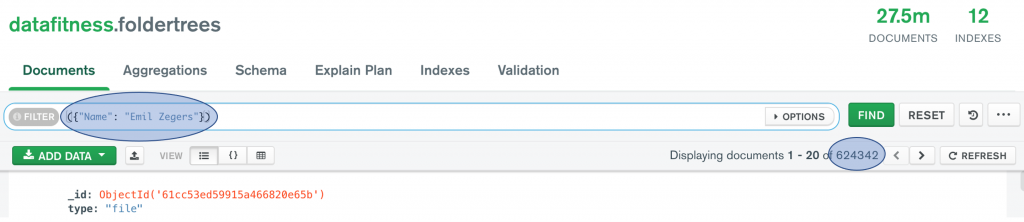
*) more on SIDs at
https://docs.microsoft.com/en-us/windows/win32/secauthz/well-known-sids